This Excel spreadsheet imports historical stock prices from Yahoo Finance (http://finance.yahoo.com). You don’t need to manually import data with text files. You simply need to specify a ticker symbol, your start and end dates, and then click a button.

Once you click the button, Excel (after calling a VBA function) connects to Yahoo Finance and retrieves daily stock quotes, placing the data into a sheet called “Data”
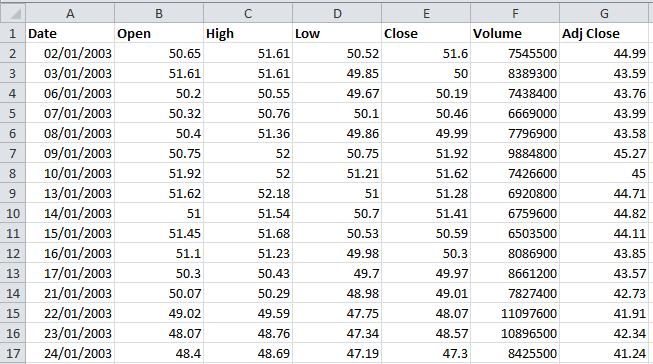
Currently, the spreadsheet imports the date (in day/month/year format), opening price, daily high, daily low, closing price, trading volume and the adjusted close. All prices are in US dollars.
You’re free to manipulate and analyze the data once it’s in Excel. As an example of some trivial analysis, clicking a button in the spreadsheet gives the arithmetic mean, the variance and the standard deviation of the daily returns (based upon the daily closing price).

You could also perform far more advanced analyses (which I’ll discuss in future blog posts). For example, I’ve used this variations of this spreadsheet to calculate investment ratios (e.g. Sharpe, Sortino and Treynor Ratios), plot histograms of daily returns to check if they’re normally distributed, identified stocks with my desired risk characteristics, and calculate mean-variance optimal portfolios.
The VBA that retrieves the data from Yahoo was adapted from code found at mathfinance.cn. It can be modified to download other data found on the web.
You’ll need to enable macros before you use the spreadsheet (Excel may warn you that you’re importing a macro-enabled worksheet).
UPDATE July 17th 2011: Here’s an Excel spreadsheet that downloads historical Forex rates for two currency pairs between two dates
UPDATE 18th August 2011: Here’s a Mathcad worksheet to download stock quotes from Yahoo Finance
UPDATE 14th February 2013: Download historical quotes into Excel for multiple stock tickers here
UPDATE 5th January 2014: I’ve just evaluated a financial data add-in for Excel MarketXLS. It’s a rock-solid route to getting live stock data inside Excel. You just use one of 80 new functions together with your chosen ticker. Disclaimer: the link to MarketXLS is an affiliate link, but this has not influenced my opinion of the tool.
UPDATE July 6th 2017: The old Yahoo Finance API was discontinued, so the spreadsheet stopped working for a while. However, I’ve now uploaded a new working version
Download Excel spreadsheet to import historical stock prices from Yahoo
Thank-you for posting these. I wrote a VBA program to get Yahoo data into a spreadsheet a couple of years ago but it was lost in a hard drive disaster and I forgot how it worked.
I have spent this day trying to get straight information from the web about working with stocks and portfolios in excel but preoccupation with finance does not really bring out the generous side of people. Most things have a fee and behind that another fee if you want the good features.
I would like to see the download macros if you don’t mind.
The VBA in the spreadsheet is already exposed – you don’t need a password
Thank you for offering this download. Unfortunately I get an compile error and the debugger opens. I am using excel 2002 and am in the UK looking for LSE stocks. I was trying to use the spreadsheet for importing the historical stock prices.
Hi Gabriella, I’ve just tried the spreadsheet in Excel 2010 and it works as expected. I don’t have Excel 2002 so I can’t test whether it works in that version so I’ll take your word for it.
Do you have access to a later version of Excel?
Can you try this version?
Thanks Samir, Its perfect. I will enjoy trying it out and thank you for a quick response.
Is there a reason that the code for the 2002 version is passworded?
There’s no reason for it to have a password (can’t remember why I put one on there). Here’s a version with no password: Yahoo Stock Quotes Excel 2002
Dear Samir
Thanks a lot – very useful.
So you have a simular spread sheet for exchange rates ?
Best regards
Jesper
Hi Jesper,
Yes, I have similar spreadsheets for exchange rates. Look at https://investexcel.net/financial-web-services-kb/
Samir
Is there a way that this can easily be modified so that it will:
1) run every day at 5 pm?
2) fetch historical data from a point from the past up to today’s date?
3) fetch data for multiple stocks at once?
4) and then insert that data into sheets titled as the stock’s ticker symbol?
Thanks! I’m new and hard at work trying to analyze stocks in my own way via excel. Any help helps!
Yes to questions 1 to 4. You just need to know some VBA to automate everything.
can you recommend the place to go to learn this specific concept??
Everything you need is on the web (I’ve never read a book). Just Google ‘vba tutorial’ (it’s how I learned). Remember to start small, and work your way up from there.
Hi, from spain, how can I get de vba password for this code,
Thanks
The Yahoo finance spreadsheet doesn’t have a password, you should be able to view the VBA.
Will this also work to download stock options? I have been having a terrible time locating a way to do this. Thank you.
– Fred
I’m currently preparing a spreadsheet that downloads option chains. Should be published soon
Thanks for the very nice macro to import historical stock quotes from Yahoo into Excel. You have made it very accessible. I am looking forward to your options spreadsheet – please post it here! (Note: the file I downloaded did not require a password. Any VBA error was due to commands not available in earlier versions of Excel – easy to fix.)
Do you have a working spreadsheet to download option chains data?
This is great! But how can I make it so that I do not need to click the “Get Data from Yahoo” button each time I enter a ticker symbol? I want to be able to run a bunch of ticker symbols through quickly without having to hit the button every time. Thanks!
Try https://investexcel.net/multiple-stock-quote-downloader-for-excel/ if you want to download stock histories for many tickers.
(I know I’m over a year late in answering this question!)
Samir
Unfortunately I get a VBA error when I use the spreadsheet in MS Excel for Mac 2011. Is there a work around?
Hi… how can I have in Excel Spread Sheet format the open, close, high, low, time and date from 1992 to date. In other words, how can I import EUR/USD graph on MT4 Platform into Excel cells?
Thanks
I’m getting a ‘variable not defined’ error so the program breaks when I try to download yahoo finance date. Thoughts?
Many thanks for this! I notice that it’s not possible to get the data from Yahoo Finance for commodities – do you know if there is a way to get the exact equivalent for commodities from somewhere else?
Hello,
When i try to compute to cells, after I have gotten the stock data, it just says value. And when I try to compute some of the data with other cell, that I have put in, it doesent seems to calculate it right. What to do?
It’s not clear what the problem is. The spreadsheet works as expected for me, and I can perform calculations with the data
Hi, the file does not seem to be working for stock indices. Is there any way this could be made to work? Really desperate for this! Thank you!
Stock indices like the S&P 500? Try using the appropriate Yahoo Finance ticker symbol (for the S&P500 it’s ^GSPC).
I’d like to manipulate the code to run this with a list 18 stock symbols. How can I do this? Thanks!
Look at https://investexcel.net/3878/multiple-stock-quote-downloader-for-excel/
Samir,
Do you know why Yahoo historical prices are not up to date anymore? It usually updates at the end of every day but for some reason the last day of price for a symbol like jpm is 4/16/13.
Thanks
Samir,
how can I modify the code to be able to add frequency (d,w,m) to this single stock download spreadsheet (the way you realized it in your Multiple Stock Quote Downloader spreadsheet)?
Thanks
Look at the VBA in the Multiple Stock Quote Downloader spreadsheet. It’s easy enough to figure out
Hi everybody,
the data I import is always in the first cell.
This is A1 for me: Date,Open,High,Low,Close,Volume,Adj Close
A2: 2013-08-29,2.68,2.77,2.68,2.75,8200,2.75
and so on.
Did anybody encounter this problem / do you know how to solve it?
Thanks a lot,
William
I’m using Excel 2010. The spreadsheet works fine for me. The data is separated into columns and rows, not just squeezed into one cell.
What version of Excel do you have?
Hi Samir,
The excel sheet doesn’t work anymore with yahoo finance. I am looking for stock quotes in excel in the Indian Market. It looks like stock quotes can now no longer be downloaded as csv from yahoo finance. Would appreciate if you can help
I’ve just tried the spreadsheet – it still works. I haven’t tried Indian stocks though
Samir,
You are obviously a king at this. Back in 2012 (September 9), you said you were preparing a spreadsheet that would import option data.
I was wondering if you had gone one further: using the multiple stock quote downloader, add code before the next ticker iteration that pulls the option data for that ticker and places it in columns H-O (Calls) and P-V (Puts). I have found code that will bring the data in, but am not savvy enough in VBA to make it mesh with the code you have already developed, which I really believe is a work of art.
Thanks in advance for taking the time to read this and consider it for use.
Hi Samir,
I am interested in downloading end of month exit prices for ALL Australian unlisted managed funds on a recurring basis. Do you know if this is possible? If so, how?
Hello!
Very nice spreadsheet. But im looking for something much easier.
I would like to get the only the last price in a cell for a stock.
If anyone could help me out i be happy.
Im looking for a function
=getPrice(“ticker”)
that would return the current price for the stock in that cell.
Thanks!
Hi Samir,
I wonder if you’ve developed a spreadsheet for retrieving option prices in Excel 2013? If yes, can you point me to where I can download it?
Many thanks.
Ali
Hello Samir:
I noticed that the data is sorted in ascending order. Is there an easy way to put it into defending order by date?
I also noticed one quirk, the end date data is appearing at the very end of the ascending data? Only the last record.
Thanks you, I have found several others yahoo data downloaders on the web but none of them are as stable and thus reliable as yours.
Thanks, Michael
I’ve just uploaded an amended version of this spreadsheet.
If you want to change the sort order, go module1 in the VBA and change Order:=xlAscending to Order:=xlDescending
By the way, you can download bulk historical data with this spreadsheet: https://investexcel.net/3878/multiple-stock-quote-downloader-for-excel/
Samir
Hi Samir,
can you tell me how to change the code from daily price intervals to weekly and monthly price intervals? I am after weekly open and close date and monthly open and close data from yahoo. Your help is much appreciated.
James
Hi Samir, on your multiple stock download spreadsheet I am trying to reorder teh output to show date, volume, open, high, low, close. I am new to this game, any help would be much appreciated.
Thanks,
James
Hello Samir
First let me say thanks, for making this spreadsheet. It is very useful for my mate and I when we analyse various companies.
However, after i got the new version of Excel, the 2013 one, I havent been able to get the spreadsheet working. I get and error code, saying something like:
Run-time error ‘1004’:
Unable to open
http://chart.yahoo.com/table.csv=s=MSFT&a=10&b=22&c=2013&d=(
The internet site reports that the item you requested could not be found. (HTTP/1.0 404)
Do you have any idea how I can fix this? It would be such a loss to miss out on your spreadsheet!
Download utility for historical data is not working – some type of server error. I don’t think the VBA code for the actual qurl is matching the server from YAHOO’s webiste…
Fixed. Download the file again.
Samir,
As mentioned above, great job on all your spreadsheets. And thank you for posting.
I was wondering why some tickers don’t work within your spreadsheets, for example: $DJUSCX (S&P Specialty Chemicals). Along with other sector/industry tickers.
Is there any way to get the sector historical data on your spreadsheets?
Best Wishes,
Chris
Hi Samir- This is so helpful. THANK YOU. I was able to download most of the indices I needed with your spreadsheet. However, I was not able to down historical prices for example for IYK. This is the ishares US consumer goods. Do you know why?
Try the bulk stock quote downloader here: https://investexcel.net/multiple-stock-quote-downloader-for-excel/
It gives me historical data for IYK
iam using the below code for pulling historical data into excel from moneycontrol.com . for each page of the website its taking one sheet and a total of 8 to 10 sheets in excel because of the code written like that. i want you to modify a little, that all the pages containing data should be imported in one sheet in excel only.
Private Const URL_TEMPLATE As String = “URL;http://www.moneycontrol.com/stocks/hist_stock_result.php?sc_id=RI&pno={0}&hdn=daily&fdt=2000-01-01&todt=2013-11-01″
Private Const NUMBER_OF_PAGES As Byte = 7
Sub test()
Dim page As Byte
Dim queryTableObject As QueryTable
Dim url As String
For page = 1 To NUMBER_OF_PAGES
url = VBA.Strings.Replace(URL_TEMPLATE, “{0}”, page)
Set queryTableObject = ActiveSheet.QueryTables.Add(Connection:=url, Destination:=ThisWorkbook.Worksheets.Add.[a1])
queryTableObject.WebSelectionType = xlSpecifiedTables
queryTableObject.WebTables = “3”
queryTableObject.Refresh
Next page
End Sub
Is there a way to alter the multiple stock sheet to just retrieve the closing prices of multiple stocks in my portfolio and plug that into my portfolio spreadsheet to update each day showing my profit or loss since I purchased the holding? I can use the historical data but I really only need the closing price each market day to calculate the ongoing status of my self-directed pension funds.
Thank you your marvelous work!
Thank you very much, the multi stock downloader is just what I wanted.
Comments:
It works for NZ stocks.
Like the poster above, I needed the data in descending order of date. Maybe most do?
The biggest snag was having to downgrade to Excel 2013.
Thanks again.
In your VBA for “Analyze data”, the code for stdev and variance should not have _P. It should be StDevP instead of StDev_P. Same thing for variance.
Hi,
do you think, that you would be able to pull the data for options aswell? Including strike, bid, ask, expiration, volume and interest?
I am sure i would not be the only one interested. Soo, maybe you could take a look at it to see if it is doable. A lot of folks used to have programs/code that would import the data, but somehow non of it seems to work anymore.
Regards,
Freddy
Funny you said that. I once wrote some VBA that scraped strikes, bids asks, etc from Yahoo Finance. However, the code stopped working some time ago and I’ve never been motivated enough to fix it 🙂
I now use a 3rd party Excel addin called MarketXLS. You just enter a function like
=YHOO_Option_StrikePrice(“SPY150220C00215000”)
into a cell and press Enter – you then get the live strike price, extracted from Yahoo Finance. The plugin does a lot more, and frankly it’s saved me a lot of headaches. You can learn more at http://technitya.com/content/stock-quotes-excel?source=investexcel
That’s an affiliate link, but I’m satisfied with the software and can safely recommend it to others
Hi!
Thanks for work you’ve done! Just have one thing to ask: You also published “Intraday Stock Data in Excel”, which takes data from google. (https://investexcel.net/free-intraday-stock-data-excel/)
Google has a widely known practice of misssing the data unfortunately. Could you please tell if it is possible to add a parameter to choose from the intraday intervals in yahoo as well?
Thank you.
No, you can’t just add a parameter to the existing code, but it can be done.
https://investexcel.net/sources-intraday-stock-data/ has an example of the Yahoo API call for intraday data..
What about the “Frequency” field in “Multiple Stock Quote Downloader for Excel” then?
Can I select let say one minute interval there? I’ve tried “60” as well as adding “min”, “m” – it doesn’t work. Any suggestions?
Thanks.
Also, could you please advise me about the timestamp?
I convert it using: =CELL/(60*60*24)+”1/1/1970″ and choose “date and time” format. That’s what I get:
14:30:59 1420468259
14:31:58 1420468318
14:32:02 1420468322
14:33:00 1420468380
14:34:00 1420468440
14:35:59 1420468559
14:36:03 1420468563
14:37:59 1420468679
14:38:00 1420468680
14:39:59 1420468799
14:40:59 1420468859
14:41:59 1420468919
14:42:00 1420468920
14:43:59 1420469039
14:44:59 1420469099
14:45:59 1420469159
Why it is different throughtout the whole session? It feels like it takes a ‘seconds’ parameter randomly, not as a close of each bar. It is especially confusing when it goes like that (should be 60 sec difference):
14:41:59 1420468919
14:42:00 1420468920
I would appreciate any recommendations.
Hi,
Thanks for the neat document! Couple of things though;
1. You should calculate the returns on column G (Adjusted Close) and not E. That way you’ll avoid errors due to stock splits etc.
2. The calculation for Avg return needs to be switched around i.e (Price today – Price yesterday)/Price Yesterday. Like this;
For i = 3 To LastRow
Sheets(“Data”).Range(“J” & i) = (Sheets(“Data”).Range(“G” & i) – Sheets(“Data”).Range(“G” & i-1)) / Sheets(“Data”).Range(“E” & i – 1)
Next i
All the best!
Samir:
I am very pleased with your spreadsheet for downloading bulk quotes. It is just what I need and it saved me a great deal of effort. Thanks!
This is a cool workbook. I just have one note, evertime you run the macro to grab the stock prices, excel creates a new connection. After running this program a few times you can be stuck with a lot of connections just sitting there taking up space. You should add something to the end to delete the connection, like:
ActiveWorkbook.Connections(“Connection”).Delete
Awesome workbook! Is there anyway to include more data in the return? For example I am needing to also get market cap along with all the other data.
The VBA in the spreadsheet at https://investexcel.net/company-financial-information-web/ will give you the market cap. However, it’s just the real-time value, not historical value.
Hi Samir
I downloaded your file and could not open it in Excel for Windows 2003. I am running Windows in emulation mode on my Mac would that be the resign. It opened OK in Excel 2011 for Mac but I could not run it, or rather I get an error Method or Data member not found to do with “For each C in this workbook.connections” and it is the word connections that is highlighted.
Thanks for any help.
Peter
Hi Samir,
Thank you for your excellent work!
I have very new to vba coding… Just want to ask you a simple question.
Is there any way to change the source code to have it retrieved a single day of stock quotes only? Right now, have to specify the start and end date. Your help is highly appreciated! Thank you.
Hello Samir,
Thank you for the great worksheet. Correct me if I’m wrong, but it appears your Daily returns are calculating in correctly.
Should the VBA code not read as:
For i = 3 To LastRow
Sheets(“Data”).Range(“J” & i) = (Sheets(“Data”).Range(“E” & i) – Sheets(“Data”).Range(“E” & i – 1)) / Sheets(“Data”).Range(“E” & i – 1)
Instead of:
For i = 3 To LastRow
Sheets(“Data”).Range(“J” & i) = (Sheets(“Data”).Range(“E” & i – 1) – Sheets(“Data”).Range(“E” & i)) / Sheets(“Data”).Range(“E” & i – 1)
Otherwise your daily return is backwards.
Thanks again!
Hi Samir,
Thank you for sharing your VBA code. I found an error in the Daily returns calculation of the AnalyzeData script, please see below.
Was…
For i = 3 To LastRow
Sheets(“Data”).Range(“J” & i) = (Sheets(“Data”).Range(“E” & ** i-1 **) –
Sheets(“Data”).Range(“E” & ** i ** )) / Sheets(“Data”).Range(“E” & i – 1)
Next i
Should be….
For i = 3 To LastRow
Sheets(“Data”).Range(“J” & i) = (Sheets(“Data”).Range(“E” & i) – Sheets(“Data”).Range(“E” & i – 1)) / Sheets(“Data”).Range(“E” & i – 1)
Next i
Regards,
Tom
hi Samir,
very good spreadsheet . it works well for excel 2013, so it is possible to download data from yahoo finance. However I can not work with the downloaded data. For example, when I download data and want other sheets to refer to them through either copy paste or even through formula, it does not work. did u experience this and what was your solution? thx, vladimir
Hi,
the stock downloader is not working since the yahoo API got shut off. Is there any alternative for this excel or is there a new version being developed, thanks
I just found this a couple of days back and yahoo guys screwed it
I’ll upload a working version soon
Great script, but now that Yahoo updated their service it stopped working. Does anybody have a fixed version which does exactly the same?
I have a new version that works with Yahoo. I’m just polishing it up between taking care of my kids and my full time job. Will upload soon
Hello Samir,
I notice the spreadsheet no longer works, this is because Yahoo disabled the old ichart URLs last month. I just want to let you know that if you are looking for a fix, you can go here:
http://www.signalsolver.com/download-historic-stock-price-data-excel
My program accepts the old URL as input, and generates the appropriate output. It should be easy to modify your spreadsheet to use it, and your users will be back in action.
Regards,
Andrew MacLean
Algorithm Science
Awesome work! Question: How do I download data in reverse order (so that most recent date is on top)?
Hi Samir,
Great sheet!
Is there a way to have this done for a basket of stocks instead of a single one?
Can the input be taken from a column?
Thanks,
look for the multiple stock quote downloader elsewhere on this site
Hi Samir,
Thank you for your effort. I am trying to run the excel on Mac machine “Sierra”. I ran into the error below. Any suggestions?
“Run-time error ‘429’:
ActiveX component can’t create object”
Thanks & regards
Pritesh
Hello Samir,
I would like to use your great macro but I found that it does not work properly for certain stocks. For example, for case of “JPC”, I got the failure in VBA code. Is the available version the final one adopted to new features of Yahoo server or is it still working version? Could you please have a look on it? Thanks a lot.
I would like to download historical data other than Open,High, low,Close and so on. Specifically, Can the sheet be altered somewhere (or link) to just download a history of “bid” prices. This is particularly useful for etf’s that quote all day but trade only some days.
What a wonderful tool this sheet has been over the years for me, thank you!
Has this recently stopped working though? I wonder if Yahoo changed something on their end?
Yahoo Finance decided to throw some toys out of the sandbox, and had to be persuaded to work again. Please download the new version